Operations
You can interact with blobs through familiar file system operations such as uploading, reading, downloading, and deleting.
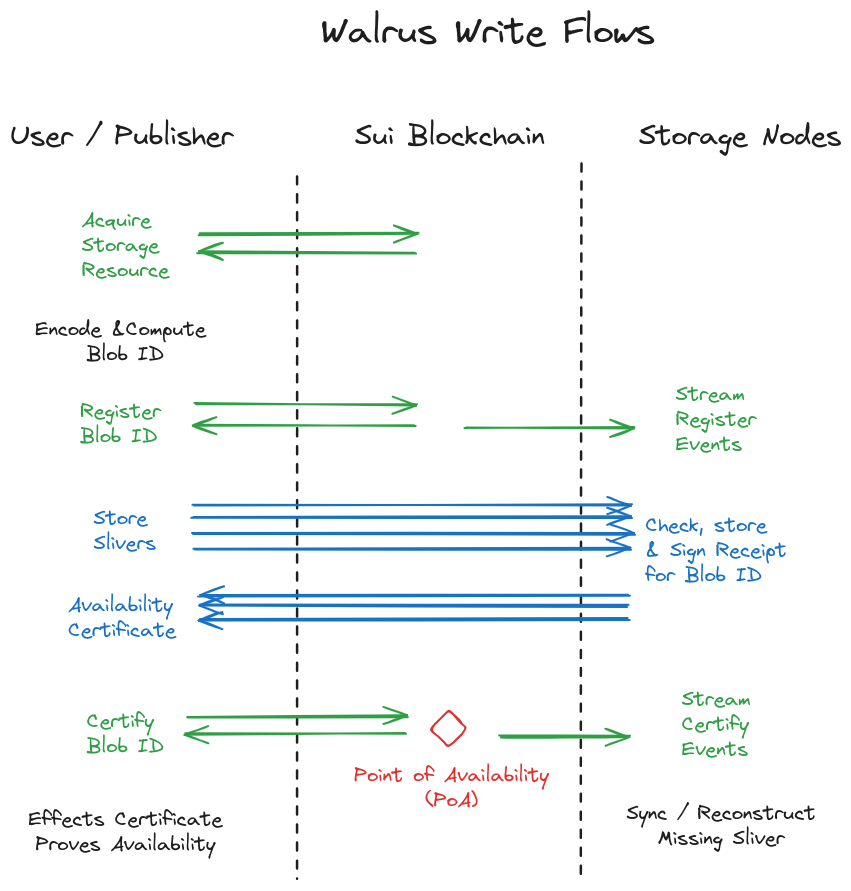
You buy storage on Walrus for a fixed number of epochs, so every blob has a lifetime. The client acquires storage on Sui, registers the blob, encodes it into slivers, distributes them to the committee, collects a write quorum of 2f + 1 signed confirmations, and posts the availability certificate to Sui. Walrus then keeps the blob retrievable for the purchased period. Extend the period to keep it available, or it expires and the system reclaims the space.
Upload
Use the following command to upload a file to Walrus:
$ walrus store file.txt --epochs 2 --context testnet
All blobs stored in Walrus are public and discoverable by all. Do not store secrets or private data on Walrus.
When you run this command, the client executes the following steps:
-
Acquire a storage resource of appropriate size and duration onchain, either directly from the Walrus system object or a secondary market. You can split, merge, and transfer storage resources.
-
Apply erasure coding to the blob, then compute the blob ID from the encoded data. The blob ID is a
u256value typically encoded as a URL-safe base64 string. You can perform the remaining steps yourself or delegate them to a publisher. -
Interact with Sui to update a storage resource and register the blob ID with the desired size and lifetime. This emits an event that storage nodes receive; the upload continues after event confirmation. Metadata is the only blob element ever exposed to Sui or its validators, because Walrus storage nodes and caches always store the content of blobs offchain. The storage nodes or caches do not need to overlap with any Sui infrastructure components (such as validators), and the storage epochs can have different lengths and timing than Sui epochs.
-
Send blob metadata to all storage nodes. Send each sliver to the storage node managing its corresponding shard.
-
Each storage node receives its sliver, verifies it against the blob ID, and checks that a valid blob resource authorizes the store. If correct, it signs a statement confirming it holds the sliver. Collect these signatures and aggregate them into an availability certificate.
-
Submit the availability certificate to the chain. Successful onchain verification emits an availability event (the point of availability (PoA)) and triggers all storage nodes to download any missing shards. After the PoA, storage nodes sync and recover missing metadata and slivers without your involvement.
The client creates the certificate of availability from 2/3 of the returned shard signatures. The erasure code rate is below 1/3, meaning that reconstruction is possible even if only 1/3 of shards return the sliver for a read. Because at most 1/3 of the storage nodes can fail, this ensures reconstruction if you request slivers from all storage nodes. A publisher can mediate the full process by receiving a blob and driving the process to completion.
-
Read completion: After the PoA for a blob ID, any correct user performing a read within the availability period eventually terminates and receives a value (V). This value is either the blob contents (F) or
None. -
Read consistency: After the PoA, if 2 correct users perform reads and receive values (V) and (V') respectively, then (V = V'). All correct readers see the same value.
-
Correct storage guarantee: A correct user with an appropriate storage resource can always perform a store operation for a blob (F) with a blob ID and advance the protocol until the PoA.
-
Correct blob retrieval: A read after the PoA for a blob (F) stored by a correct user returns (F). Correctly stored blobs are always retrievable.
A publisher that accepts and publishes blobs through HTTP also performs these steps.
Maximum blob size
You can query the maximum blob size through the walrus info CLI command. The maximum blob size is currently 13.3 GiB. You can store larger blobs by splitting them into smaller chunks.
Walrus stores blobs for the number of epochs you specify when you store them. Walrus storage nodes ensure the blob is available through the number of epochs specified. Mainnet uses an epoch duration of 2 weeks.
Read
To read a blob after you store it on Walrus, use the walrus read command and provide the blob ID:
$ walrus read <blob-id> --context testnet
Reading a blob does not save it to a local storage location. See download for more information.
The client or the aggregator service that exposes an HTTP interface to read blobs performs read operations. Reads are resilient and succeed in recovering the blob if up to 1/3 of storage nodes are unavailable. In most cases, after synchronization is complete, you can read blobs even if 2/3 of storage nodes are down.
Reading blobs from Walrus can occur directly or through aggregators and caches. The operations are identical whether end users, aggregators, or caches experiencing cache misses perform them. In practice, most reads occur through caches for frequently accessed blobs and do not require requests to storage nodes.
The read flow uses the following steps:
-
The network uses the blob ID to obtain the metadata for the blob ID from any storage node and authenticate it using the blob ID.
-
The client queries the system object on Sui to determine the storage nodes that store that blob's metadata and slivers.
-
The client sends a request to the storage nodes for the shards corresponding to the blob ID. The request waits for (f+1) responses. The client sends sufficient requests in parallel to ensure low latency for reads.
-
The client authenticates the returned slivers with the blob ID, reconstructs the blob, and determines whether the contents are valid or inconsistent.
-
Optionally, the client caches the result and can serve it without reconstruction until the cache evicts it. Requests to the cache for the blob return the blob contents or an inconsistency proof.
Download
To download a blob and save it on your local machine, run the following command:
$ walrus read <blob-id> --out file.txt --context testnet
Replace <blob-id> with the blob's identifier that the walrus store command returns in its output, and replace file.txt with the name and file extension for storing the file locally.
Certify availability
Once a blob is certified, Walrus ensures that sufficient slivers are always available on storage nodes to recover it within the specified epochs.
You can verify blob availability in 3 ways:
-
Using the certified blob event: Use a Sui SDK read to authenticate the certified blob event that Sui emits when it certifies the blob ID. The
walrus blob-statuscommand identifies the event ID to check. -
Using the blob object: Use a Sui SDK read to authenticate the Sui blob object corresponding to the blob ID, verify it is certified, before the expiry epoch, and not deletable.
-
Using a smart contract: A Sui smart contract can read the blob object on Sui to verify it is certified, before the expiry epoch, and not deletable.
The underlying protocol of the Sui light client returns digitally signed evidence for emitted events or objects, and offline or non-interactive applications can use it as a proof of availability for the blob ID for a certain number of epochs.
Delete
To delete a blob, run the following command:
$ walrus delete --blob-id <blob-id> --context testnet
Replace <blob-id> with the blob's identifier that the walrus store command returns in its output.
The user that creates a blob can set it as deletable. The Sui blob object stores this metadata, and certified blob events include whether a blob is deletable. The owner of the blob object can delete a deletable blob to reclaim and reuse the storage resource associated with it.
If no other copies of the blob exist on Walrus, deleting a blob eventually makes it unrecoverable using read commands. However, if other copies of the blob exist on Walrus, a delete command reclaims storage space for the user that invoked it but does not make the blob unavailable until all other copies expire or their owners delete them.
Use Sui object and blob ID utilities
The command walrus blob-id <FILE> derives the blob ID of any file. The blob ID is a commitment to the file, and any blob with the same ID decodes to the same content. The blob ID is a 256-bit number, and some Sui explorers represent it as a large decimal number. The command walrus convert-blob-id <BLOB_ID_DECIMAL> converts it to a base64 URL for use by the command line tools and other APIs.
The walrus list-blobs command lists all non-expired Sui objects that the current account owns, including their blob ID, object ID, and metadata about expiration and deletable status. The --include-expired option also lists expired Sui objects.
You can reclaim the Sui storage cost associated with Sui objects by burning the Sui object. Burning does not delete the Walrus blob, but means that operations such as extending its lifetime, deleting it, or modifying attributes are no longer available. The walrus burn-blobs --object-ids <SUI_OBJ_IDS> command burns a specific list of Sui object IDs. The --all flag burns the Sui objects for all blobs under the user account, and --all-expired burns all expired blobs under the user account.
Extend a blob's storage duration
Refresh operations run entirely through the Sui protocol because they involve no blob content. To extend a blob's storage duration, you must reference the Sui object ID and indicate how many epochs you want to extend the blob's storage for.
Run the following command to extend a blob's storage duration by 3 epochs. You must use the Sui object ID, not the blob ID:
$ walrus extend --blob-obj-id <blob-object-id> --epochs-extended 3 --context testnet
Replace <blob-object-id> with the blob's Sui object ID that the walrus store command returns in its output. Upon success, storage nodes receive an emitted event to extend the storage duration for each sliver.
Manage blob attributes
Walrus lets you associate a set of key-value attribute pairs with a Sui object. While the keys and their values can be arbitrary strings to accommodate any needs, aggregators convert specific keys to HTTP headers when serving blobs. Each aggregator can decide which headers it allows through the --allowed-headers CLI option. You can view the defaults through walrus aggregator --help.
The following command sets attributes key1 and key2 to values value1 and value2, respectively.
$ walrus set-blob-attribute <blob-object-id> --attr "key1" "value1" --attr "key2" "value2"
The following command returns all attributes associated with a blob ID:
$ walrus get-blob-attribute <blob-object-id>
The following command deletes the attributes with keys listed, separated by commas or spaces.
$ walrus remove-blob-attribute-fields <blob-object-id> --keys "key1,key2"
The following command deletes all attributes of a Sui object:
$ walrus remove-blob-attribute <blob-object-id>
Attributes attach to Sui object IDs rather than to the blobs themselves on Walrus. This means that deleting attributes reclaims gas for storage and that the same blob contents can have different attributes for different Sui objects with the same blob ID.
Inconsistency handling
After the PoA, a correct storage node attempting to reconstruct a sliver might fail if blob encoding was incorrect. In this case, the node can extract an inconsistency proof for the blob ID. It then uses the proof to create an inconsistency certificate and uploads it onchain.
Inconsistency handling uses the following process:
-
A storage node fails to reconstruct a sliver and computes an inconsistency proof.
-
The storage node sends the blob ID and inconsistency proof to all storage nodes of the Walrus epoch. The storage nodes verify the proof and sign it.
-
The storage node that found the inconsistency aggregates the signatures into an inconsistency certificate and sends it to the Sui smart contract, which verifies it and emits an inconsistent resource event.
-
Upon receiving an inconsistent resource event, correct storage nodes delete sliver data for the blob ID and record in the metadata to return
Nonefor the blob during the availability period. Storage nodes issue no storage attestation challenges for this blob ID.
Reading inconsistent blobs
A blob ID marked as inconsistent always resolves to None upon reading. This occurs because the read process re-encodes the received blob to verify that the blob ID derives from consistent encoding.
An inconsistency proof reveals only a true fact to storage nodes (which do not otherwise run decoding) and does not change read output in any case.
However, partial reads that use the systematic nature of the encoding might successfully return partial data for inconsistently encoded files. If consistency and availability of reads is important, perform full reads rather than partial reads.
Challenge mechanism for storage attestation
During an epoch, a correct storage node challenges all shards to provide symbols for blob slivers past PoA:
-
The sequence of Sui events up to the past epoch determines the list of available blobs for the epoch. Storage nodes do not challenge inconsistent blobs, and the challenged shard can return a record proving this status instead.
-
Providing a seed to the challenged shard determines a challenge sequence. The sequence then derives from the seed and the content of each challenged blob ID. This creates a sequential read dependency.
-
The response to the challenge provides the sequence of shard contents for the blob IDs in a timely manner.
-
The challenger node uses thresholds to determine whether the challenged node passed the challenge and reports the result onchain.
-
The challenge and response communication uses authentication.
Challenges provide reassurance that the storage node can actually recover shard data in a probabilistic manner, preventing storage nodes from receiving payment without any evidence they can retrieve shard data. The sequential nature of the challenge and a reasonable timeout also ensure that the process is timely.